Choosing the Right Tablet
Before diving into the transformation, it’s crucial to select the right tablet based on your smart home ecosystem. Compatibility with your existing smart home platform is key.
- Apple iPads are ideal for those using Apple HomeKit devices, offering seamless integration with Siri.
- Amazon Fire Tablets are perfect for Alexa-powered ecosystems, providing easy access to Alexa’s capabilities.
- Android Tablets, running Android 9 or newer, are versatile choices for users in the Google Home ecosystem, offering flexibility with various smart home apps.
Ensure your chosen tablet is in good working condition, with a functioning screen and the latest OS updates. A reliable power source, whether through a charger or constant plug-in, is essential since the tablet will serve as a central hub for your smart home.
Setting Up Your Smart Home Hub
With your tablet selected, the next step is setting it up as a smart home hub. This involves installing smart home management apps and possibly integrating voice assistants like Google Assistant or Alexa for hands-free control.
- Download Smart Home Apps: Install apps compatible with your smart home platform. For instance, Apple users might opt for the Home app, while Android users could choose Google Home or SmartThings.
- Enable Voice Control: Integrate Google Assistant or Alexa for voice commands. This step enhances usability, allowing you to control your smart home with spoken instructions.
- Customize Your Display: Consider transforming your tablet into a digital photo frame or displaying relevant information when idle. This adds a personal touch and makes the hub more interactive.
Enhancing Accessibility with Stands and Mounts
To maximize the utility of your tablet as a smart home hub, consider how and where you’ll use it. Two common setups are:
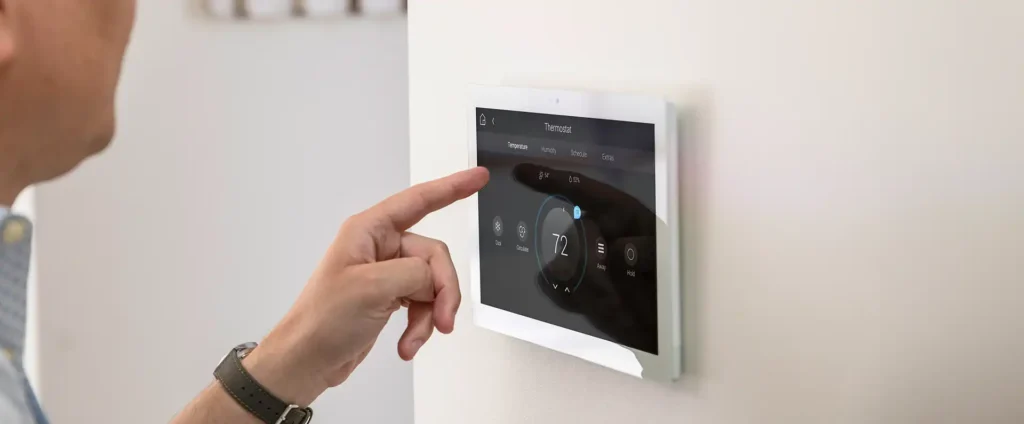
- Wall Mount: Securely mounts the tablet in a central location, making it accessible for all household members. This option keeps the hub within view and easy to reach.
- Portable Stand: Offers flexibility, allowing you to move the tablet between rooms. This setup is beneficial for households with varying needs across different spaces.
Conclusion
Repurposing an old tablet into a smart home hub is a cost-effective and convenient way to enhance your home’s smart capabilities. By choosing the right tablet, setting it up with smart home apps, and selecting an optimal placement method, you can transform an otherwise unused device into a valuable tool for managing your smart home ecosystem.
Transforming Your Tablet into a Smart Home Hub
Understanding the Concept
In the modern age of smart technology, the ability to control various aspects of our homes remotely is no longer a luxury but a necessity. A smart home hub serves as the brain of your smart ecosystem, allowing all your devices to communicate and work together seamlessly. By converting an old tablet into a smart home hub, you essentially create a centralized platform that can manage lights, thermostats, security systems, and much more, all from one convenient place.
Why Use a Tablet?
Tablets offer several advantages over dedicated smart hubs:
- Versatility: Tablets come with a wide range of apps designed for smart home integration, making them highly adaptable.
- Screen Size: The larger screen size of tablets makes navigating menus and settings easier than on smaller screens.
- Portability: With Wi-Fi connectivity, you can carry your tablet around the house, giving you the flexibility to control your smart home from anywhere within its range.
Step-by-Step Guide to Repurposing Your Tablet
- Choose the Right Apps: Select smart home management apps that support your existing devices. Popular choices include SmartThings, Philips Hue Bridge, and Nest. These apps often have user-friendly interfaces and extensive device compatibility lists.
- Install Necessary Software: Download the chosen app(s) onto your tablet. Ensure your tablet’s operating system is up-to-date to avoid compatibility issues.
- Set Up Your Devices: Connect your smart devices to the same Wi-Fi network as your tablet. Follow the manufacturer’s instructions for setting up each device. Most smart devices require you to download their own app for initial setup.
- Integrate Devices Through the App: Open the smart home management app on your tablet and add your devices. Each app may have a slightly different process, but generally, you’ll need to enter the device model number or use a QR code scanner within the app.
- Customize and Control: Once integrated, you can customize your smart home settings, such as creating routines or automations. For example, you could set your lights to turn off automatically when you leave the house.
Benefits of Using a Tablet as a Smart Home Hub
- Cost-Effective: Reusing an old tablet is significantly cheaper than purchasing a dedicated smart home hub.
- Scalability: As you add more smart devices, your tablet-based hub can easily scale to accommodate them.
- Personalization: Tailoring your smart home setup to your preferences becomes simpler with a tablet hub, thanks to its intuitive interface and customizable features.
Conclusion
Turning a tablet into a smart home hub is a practical and cost-effective way to enhance your home’s smart capabilities. By following the steps outlined above, you can enjoy the convenience of controlling all your smart devices from one central location, making your home smarter, safer, and more comfortable.
Why Repurpose Your Old Tablet as a Smart Home Hub
Turning an outdated tablet into a smart home hub is not just a clever way to recycle; it’s a strategic move that offers numerous benefits. Here’s why this approach stands out:
Cost-Effectiveness: The Budget-Friendly Choice
Investing in a dedicated smart home hub can be costly, especially when you consider the rapid pace at which technology evolves. By leveraging an old tablet, you effectively delay the need for such an investment. This strategy allows you to save money while still enjoying the convenience of a connected home ecosystem.
Customization: Tailored Placement and Functionality
One of the greatest advantages of using a tablet as a smart home hub is its versatility. Unlike traditional hubs, tablets come in various sizes and can be mounted or placed virtually anywhere in your home. This flexibility ensures that your smart devices can be strategically positioned to maximize their effectiveness and efficiency.
Compatibility: A Universal Solution
The beauty of repurposing a tablet lies in its universal compatibility. Whether your tablet is from Apple, Samsung, or another manufacturer, with the appropriate apps and accessories, it can serve as a central control unit for all your smart devices. This inclusivity makes it easier to integrate new technologies into your existing smart home setup without worrying about compatibility issues.
By understanding these key points, you can see how turning an old tablet into a smart home hub is not merely a workaround but a powerful solution that combines cost savings, customization options, and broad compatibility. This approach democratizes the smart home experience, making it accessible to everyone, regardless of their initial tech setup or budget constraints.
Choosing the Perfect Tablet for Your Smart Home Hub
Turning your tablet into a smarthome hub is a game-changer, allowing you to control all your smart devices from one convenient place. But to make this happen, you need the right tablet. Here’s how to pick one that fits your needs perfectly:
Platform Compatibility: The Key to Integration
First off, compatibility with your preferred smart home platform is paramount. Whether you’re an Apple enthusiast who loves Siri, an Amazon Prime member who relies on Alexa, or a Google fan who prefers Assistant, your tablet must support the same ecosystem. This ensures seamless integration and control over your smart devices.
Example: If you’re using Philips Hue lights and Nest thermostats, a tablet compatible with Google Home will allow you to adjust your lighting and temperature settings effortlessly.
Condition Matters: Check Before You Buy
Before diving into the smart home world, give your tablet a once-over. It should be in top-notch condition, with a responsive screen and a battery that doesn’t quit. Also, keep your operating system up-to-date to avoid any hiccups when connecting to your smart devices.
Tip: Regularly updating your tablet’s software ensures it stays secure and performs optimally, which is crucial for a smooth smart home experience.
Power Supply: Keeping the Juice Flowing
A reliable power source is non-negotiable, especially if your tablet isn’t known for its long battery life. Opt for a model that can run continuously without worrying about charging. A wall adapter is your best bet for a steady stream of power.
Why It Matters: Consistent power ensures your tablet remains operational around the clock, ready to control your smart home at any moment.
By focusing on these key aspects—platform compatibility, device condition, and power supply—you’ll be well on your way to transforming your tablet into a powerful smarthome hub. Remember, the right tools make all the difference in creating a smart, efficient living space.
Turning your tablet into a smart home hub opens up a world of convenience and control over your home’s devices. Here’s how to get started:
Choosing the Right Apps
First, select apps that support smart home integration. Popular choices include:
- SmartThings by Samsung: Offers extensive device compatibility and easy setup.
- Home Assistant: An open-source platform that allows for deep customization.
- Wink: Simplifies controlling a wide range of smart devices.
Each app has its strengths, so choose one that fits your needs and the devices you plan to use.
Setting Up Your Smart Home Hub
- Download and Install: Download the chosen app from the App Store or Google Play Store and install it on your tablet.
- Create an Account: Sign up for an account within the app, which will be used to manage your smart home devices.
- Add Devices: Use the app to discover and add compatible smart devices to your network. This process varies by app but generally involves scanning QR codes or searching for device names.
Integrating Devices
Integrating devices into your smart home ecosystem involves connecting them to the internet and linking them through your tablet hub. For example, to connect a smart bulb:
- Power On Device: Ensure your smart bulb is powered on and connected to your Wi-Fi network.
- Open App: Launch the smart home app on your tablet.
- Add Device: Navigate to the “Add Device” option and follow the prompts to find and link your smart bulb.
Repeat this process for each device you wish to integrate, adjusting the steps as necessary based on the device type and app instructions.
Managing Your Smart Home
Once integrated, managing your smart home becomes as simple as tapping on your tablet screen. You can:
- Control Lighting: Adjust brightness and color temperature of smart bulbs.
- Monitor Security: Check live feeds from security cameras.
- Manage Energy: Schedule smart plugs to turn off appliances during peak energy hours.
Advantages of Using a Tablet as a Smart Home Hub
- Portability: Control your home from anywhere, making it ideal for remote management.
- Customization: Tailor your smart home experience with customizable settings and automation rules.
- Cost-Effective: Often requires only a single purchase for the tablet and minimal monthly fees for subscription services.
By following these steps, you can effortlessly transform your tablet into a powerful smart home hub, enhancing your living space with convenience and efficiency.
Selecting Your Smart Home Management App
Choosing the right smart home management app is the first step towards turning your tablet into a smarthome hub. This decision is crucial as it determines how seamlessly you’ll be able to manage and automate your smart devices. Let’s delve into why selecting the right app matters and how to go about making this choice.
Understanding Smart Home Apps
Smart home apps serve as the central nervous system of your smart ecosystem, connecting all your devices and allowing them to communicate and work together. They offer a user-friendly interface through which you can monitor and control your smart devices from anywhere. Whether it’s adjusting the thermostat, locking doors, or setting up automated routines, smart home apps enable these functionalities with ease.
Popular Choices: Home Assistant, Node-RED, and Sharp Tools
When it comes to popular smart home management apps, three names frequently come up: Home Assistant, Node-RED, and Sharp Tools. Each offers unique features and capabilities, catering to different user preferences and needs.
- Home Assistant: Known for its open-source nature, Home Assistant provides extensive customization options. It allows users to integrate a wide range of smart devices and services, making it a versatile choice for those looking to build a comprehensive smart home setup.
- Node-RED: This platform stands out for its visual programming approach, enabling users to create flows between devices without needing deep coding knowledge. It’s ideal for users who prefer a more graphical way of setting up automations.
- Sharp Tools: Focused on providing a sleek and intuitive interface, Sharp Tools simplifies the process of managing smart devices. It supports a variety of smart home protocols and offers easy integration with many popular devices.
How to Choose
Selecting the best smart home management app depends on several factors, including the types of smart devices you own, your comfort level with technology, and what you hope to achieve with your smart home setup. Consider the following when making your selection:
- Device Compatibility: Ensure the app supports the smart devices you plan to use. Most major brands and models are supported by the apps mentioned above, but it’s always good to check compatibility lists.
- Ease of Use: Look for an app that matches your tech-savvy level. If you’re new to smart homes, opt for an app with a user-friendly interface and plenty of resources for beginners.
- Customization and Automation Capabilities: Depending on your goals, you might prioritize an app that offers extensive customization options or one that makes setting up automation routines simple and intuitive.
Conclusion
Choosing the right smart home management app is essential for effectively turning your tablet into a smarthome hub. By considering device compatibility, ease of use, and customization capabilities, you can select an app that will empower you to manage and automate your smart devices efficiently. Remember, the key to a successful smart home setup lies in choosing an app that aligns with your needs and preferences, paving the way for a seamless and enjoyable smart living experience.
Connecting Your Tablet to Smart Devices
To transform your tablet into a smarthome hub, the first step is integrating it with your existing smart devices. This process is straightforward but requires a few key steps to ensure seamless connectivity.
Downloading Manufacturer Apps
Start by visiting the app store on your tablet and searching for the official app of each smart device you wish to control. For instance, if you have Philips Hue lights, you’ll find the Philips Hue app. Similarly, for a Nest thermostat, download the Nest app. These apps are essential as they provide the interface through which you’ll interact with your devices.
Logging In and Adding Devices
After installing the apps, open them and log in using the same account credentials you use for the smart devices themselves. This synchronization ensures that your tablet can communicate directly with the devices. Next, navigate through the app menus to locate the option for adding new devices. Here, you’ll input the serial number or scan the QR code associated with each smart device. This process varies slightly depending on the brand and model of the device but generally follows a similar pattern across most apps.
Centralizing Control with a Smart Home Manager App
For a truly unified experience, consider using a smart home manager app. These apps act as a central hub, allowing you to manage all your smart devices from one place. Examples include SmartThings by Samsung, Wink, and Philips Hue Bridge. After choosing a smart home manager app, download and install it on your tablet. Then, integrate it with the manufacturer apps of your smart devices. This integration often involves linking accounts or granting permissions within the smart home manager app settings.
Practical Example: Setting Up a Smart Lighting System
Let’s say you want to set up a smart lighting system controlled by your tablet. First, download the Philips Hue app and log in. Add your Philips Hue bulbs by entering their serial numbers. Once added, you can adjust brightness, color, and scheduling directly from your tablet. To further streamline your setup, integrate the Philips Hue app with a smart home manager app like SmartThings. This way, you can control your lights alongside other smart devices, such as thermostats and security cameras, all from the SmartThings app.
By following these steps, you effectively turn your tablet into a versatile smarthome hub, capable of managing various smart devices efficiently. This approach not only enhances convenience but also offers a cohesive user experience tailored to your preferences and routines.
Customizing Your Smart Home Dashboard
To transform your tablet into a comprehensive smarthome hub, leveraging its customization features is crucial. This involves creating a personalized dashboard within your smart home management app, which serves as the central command center for all your smart devices. Here’s how you can achieve this effectively:
Understanding Widgets
At the heart of customizing your dashboard are widgets. These are interactive elements that allow you to control various aspects of your smart home, such as lights, thermostats, and security systems. Each widget represents a function or device in your smart ecosystem, making it easy to manage everything from one place.
Adding Essential Widgets
Start by adding essential widgets for key areas of your smart home:
- Lighting Controls: Adjust the brightness and color temperature of your smart bulbs directly from your dashboard.
- Thermostat Adjustments: Monitor and adjust the temperature settings of your smart thermostat to maintain comfort levels.
- Security Monitoring: Keep an eye on your home’s security cameras and receive alerts for any unusual activity.
Creating a User-Friendly Interface
The ultimate goal of customizing your dashboard is to enhance usability. A well-designed interface simplifies the process of managing your smart home, ensuring that every feature is accessible and intuitive. Here are some tips for achieving a user-friendly layout:
- Group Similar Devices: Organize related widgets together, such as all lighting controls in one area and security features in another.
- Use Clear Labels: Label each widget clearly so you know what each one does at a glance.
- Optimize Touch Targets: Ensure buttons and controls are large enough to tap easily, reducing the risk of accidental adjustments.
Practical Examples
Imagine having the ability to turn off all lights in your house with a single button press, or adjusting the thermostat remotely before you arrive home. These scenarios highlight the convenience of a customized dashboard. By tailoring your tablet’s interface to fit your lifestyle and preferences, you unlock a level of control and efficiency that traditional home automation setups cannot match.
References and Further Reading
For those looking to dive deeper into the world of smart home customization, resources like SmartHomeBeginner offer detailed guides and tutorials. Additionally, exploring forums such as Reddit’s r/smarthome can provide insights and advice from fellow enthusiasts.
By following these steps and utilizing the wealth of available resources, you can transform your tablet into a powerful smarthome hub, tailored to meet your unique needs and preferences.
Setting Up Your Tablet as a Smart Home Hub: Display Options
Transforming your tablet into a central command center for your smarthome requires careful consideration of its placement within your living space. The choice of display method significantly impacts usability and accessibility. Here are some practical tips and considerations to help you decide on the best setup.
Choosing the Right Mounting Solution
Selecting the right mounting solution is crucial for both functionality and aesthetics. Wall mounts and stands are among the most popular options due to their versatility and convenience. These solutions allow you to place your tablet in high-visibility areas, ensuring it remains easily accessible without obstructing pathways or creating tripping hazards.
Key Considerations for Mounting Solutions:
- Security: Ensure the mount securely holds the tablet, preventing accidental falls or damage from children or pets.
- Accessibility: Choose a mount that provides unhindered access to all buttons, ports, and the camera. This ensures you can control your smarthome devices seamlessly.
- Adjustability: Look for mounts that offer adjustable angles and heights. This flexibility allows you to position the tablet optimally for viewing and interaction, whether mounted on a wall or placed on a stand.
Practical Examples and Tips
To illustrate the importance of these considerations, let’s consider a few scenarios:
- Living Room Setup: For controlling lights, entertainment systems, and smart appliances, placing the tablet on a wall-mounted stand at eye level is ideal. This setup allows you to monitor and adjust settings with ease while enjoying your leisure time.
- Kitchen Convenience: In the kitchen, a magnetic strip under the fridge or on the wall near the stove can be an innovative way to keep your tablet within reach for quick recipe searches, timers, and smart cooking device controls.
- Bedroom Comfort: A bedside table mount can transform your tablet into a sleep companion, allowing you to control smart lighting, thermostats, and alarms without having to leave the comfort of your bed.
Visual Aids and References
While this guide primarily focuses on textual advice, incorporating visual aids such as charts or images comparing different mounting solutions can greatly enhance understanding. Additionally, exploring product reviews and recommendations from reputable tech blogs and forums can provide further insights into the best practices for setting up your tablet as a smarthome hub.
By thoughtfully selecting your tablet’s display method and considering the key factors outlined above, you can create a seamless and efficient smarthome control experience tailored to your lifestyle and preferences.
Transforming Your Tablet into a Smart Home Hub
Turning your old tablet into a smart home hub opens a world of possibilities, making your home smarter and more efficient. Here’s how you can do it step-by-step, along with practical tips and examples to get you started.
Choosing the Right Apps
The first step is selecting the right apps that will turn your tablet into a control center for all your smart devices. Look for apps that offer broad compatibility with various smart home products, such as lights, thermostats, security cameras, and more. Examples include SmartThings, Philips Hue Bridge, and Amazon Alexa app. These apps not only allow you to control your devices but also integrate them seamlessly, creating a cohesive smart home ecosystem.
Setting Up Your Smart Home Hub
- Install the App: Download and install the chosen smart home app from your tablet’s app store.
- Create an Account: Sign up or log in to the app using your email address or existing account credentials.
- Connect Devices: Follow the app’s instructions to connect your smart devices. This usually involves opening the device’s settings, finding its Wi-Fi network, and entering the password provided by the app.
- Set Up Automations: Once connected, explore the app’s automation features. For instance, you can set your lights to turn off automatically when you leave the house or have your thermostat adjust to your preferred temperature upon waking up.
Enhancing Your Smart Home Experience
To truly leverage the potential of turning your tablet into a smart home hub, consider exploring additional features and integrations:
- Voice Control: Enable voice commands through your tablet for hands-free control over your smart devices. Most smart home apps support voice assistants like Google Assistant or Amazon Alexa.
- Security Cameras Integration: Connect your tablet to security cameras for real-time monitoring and alerts directly from your tablet.
- Energy Management: Use your tablet to manage energy consumption across your home, adjusting lighting and appliances to reduce electricity bills.
Staying Updated
The smart home landscape is constantly evolving, with new devices and features being introduced regularly. Keep your tablet-based smart home hub up-to-date by checking for app updates and exploring new integrations. Engaging with online communities and forums can also provide insights into the latest trends and innovations in smart home technology.
By following these steps and tips, you’ve unlocked the full potential of transforming your tablet into a versatile smart home hub. Enjoy enhancing your home’s functionality and embracing a more convenient, efficient lifestyle.