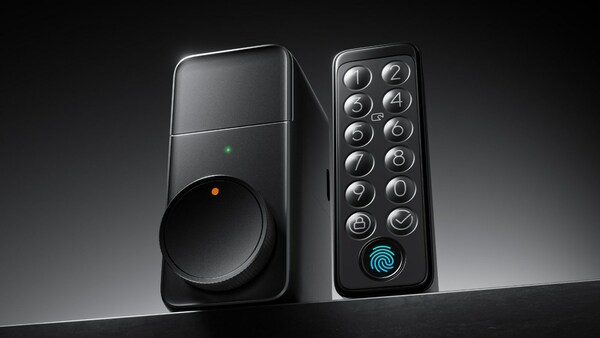

Integrating the Switchbot Lock Pro into your smart home ecosystem can significantly enhance your security and convenience. This guide will walk you through setting up the Switchbot Lock Pro with Home Assistant and Matter, focusing on a local API connection for optimal performance and reliability.

WiFi Smart CO Gas Sensor Carbon Monoxide Leakage Fire Security Detector, with US Plug - $41.99
Retail Price: $58.79
You Save: $16.80
Understanding the Basics
Before diving into the setup, it’s crucial to understand the key components involved in this integration:
- Switchbot Lock Pro: An electric smart door lock designed for home security, offering various access methods including fingerprint recognition, NFC tags, and passcodes.
- Home Assistant: An open-source home automation platform that allows you to control and automate your smart home devices.
- Matter: A new connectivity standard designed to simplify the smart home experience by enabling seamless interoperability between devices.
Setting Up the Environment
To integrate the Switchbot Lock Pro with Home Assistant and Matter, you’ll need the following prerequisites:
- Switchbot Hub Mini or Hub 2: These devices act as bridges between the Switchbot Lock Pro and the Matter network, facilitating communication with Home Assistant.
- Home Assistant: Ensure you have the latest version installed and running on your system.
- Matter Server Add-On: This component is essential for connecting Matter devices to Home Assistant. Follow the official Home Assistant documentation to set it up correctly.
Step-by-Step Integration Guide
- Pair the Switchbot Hub with the Switchbot App: Start by pairing your Switchbot Hub (Mini or Hub 2) with the Switchbot app. This step is crucial for configuring the hub and preparing it for Matter integration.
- Configure the Switchbot Lock Pro: Using the Switchbot app, add the Lock Pro as a device and configure it according to your preferences. This includes setting up access methods such as fingerprints, NFC tags, and passcodes.
- Connect the Switchbot Hub to Home Assistant via Matter:
- Open the Home Assistant dashboard and navigate to
Settings > Devices & Services. - Select
Add Integrationand then chooseAdd Matter Device. - Follow the prompts to pair your Switchbot Hub with Home Assistant using the Matter protocol.
- Open the Home Assistant dashboard and navigate to
- Add the Switchbot Lock Pro as a Sub-Device:
- With the Switchbot Hub now integrated into Home Assistant, proceed to add the Lock Pro as a sub-device.
- This can typically be done within the Matter settings of the Switchbot Hub in Home Assistant, where you’ll find options to manage connected devices.
Troubleshooting Tips
- If you encounter issues during the setup, ensure that all components are powered on and within range of each other.
- Verify that the latest firmware versions are installed on both the Switchbot Lock Pro and the Switchbot Hub.
- Check the Home Assistant logs for any error messages related to the Matter integration or device connectivity.
Conclusion
Integrating the Switchbot Lock Pro with Home Assistant and Matter provides a secure and efficient way to control your front door access. By following the steps outlined above, you can enjoy the benefits of advanced security features and seamless integration with your existing smart home setup. Remember, staying updated with the latest firmware and software versions is key to maintaining optimal performance and compatibility.

Understanding Local Control with Switchbot Lock Pro
In the bustling world of smart home technology, the quest for privacy and reliability often leads us back to the basics: local control. Amidst the sea of smart devices clamoring for our attention, one standout product emerges: the Switchbot Lock Pro. This innovative smart lock isn’t just another gadget; it’s a gateway to enhanced security and convenience for homeowners. Let’s dive deeper into how you can integrate the Switchbot Lock Pro with Home Assistant, harnessing the might of Matter for unparalleled, local control over your front door.
The Power of Local Control
Imagine having complete autonomy over your home’s security without relying on the cloud or an internet connection. That’s the essence of local control, and it’s precisely what the Switchbot Lock Pro offers. By operating independently from the internet, it ensures your home remains secure, even when online services are down or compromised.
Integrating Switchbot Lock Pro with Home Assistant
To unlock the full potential of your Switchbot Lock Pro, integrating it with Home Assistant is a game-changer. Home Assistant is a powerful, open-source platform that allows you to manage all your smart home devices seamlessly. Here’s a step-by-step guide to get you started:
- Setup Your Environment: Ensure you have Home Assistant installed and running on your preferred device. If you’re new to Home Assistant, visit their official website for installation guides tailored to various platforms.
- Add Switchbot Lock Pro to Home Assistant: Navigate to the “Configuration” tab within Home Assistant. From here, select “Integrations”, then click on “Add Integration”. Search for “Switchbot Lock Pro” and follow the prompts to connect your device.
- Configure Matter Support: To leverage the benefits of Matter, ensure both your Switchbot Lock Pro and Home Assistant support this standard. During the integration process, you’ll be asked to enable Matter compatibility. Confirm this setting to enjoy seamless, local control.
- Customize Your Experience: With Home Assistant, customization is key. Explore the “Lovelace UI” to create custom dashboards and automations that suit your lifestyle. For instance, you could set up a scene that automatically locks your door when you leave the house, ensuring peace of mind.
Why Choose Local Control?
Choosing local control with the Switchbot Lock Pro means prioritizing privacy and reliability. It’s about taking back control over your home’s security, knowing that your smart lock operates independently of external networks. This approach not only enhances security but also reduces dependency on third-party services, making your home smarter and more self-reliant.
Conclusion
In the ever-evolving landscape of smart home technology, the Switchbot Lock Pro stands as a beacon of privacy and reliability. By integrating it with Home Assistant and embracing the power of local control, you’re not just securing your home; you’re enhancing your quality of life. Whether you’re a tech-savvy individual or simply looking to upgrade your home’s security, the Switchbot Lock Pro offers a practical, efficient solution that puts you in charge of your living space.
Enhancing Your Home Security: The Power of Home Assistant and Matter
Integrating Home Assistant with Switchbot Lock Pro
Home Assistant stands out as a leading open-source platform for home automation, empowering users to create a seamless smart home experience tailored to their needs. When paired with the innovative Switchbot Lock Pro, a device designed to secure doors without compromising convenience, the integration opens up a world of possibilities for enhancing home security.
Benefits of the Integration
- Local Control: With Home Assistant managing the Switchbot Lock Pro, you maintain full control over your door locks directly from your local network. This setup ensures that your commands are executed swiftly and securely, without relying on the internet.
- Enhanced Security: Leveraging Matter, a new connectivity standard aimed at unifying smart home devices, adds an extra layer of security. Matter-certified devices, including the Switchbot Lock Pro when integrated with Home Assistant, adhere to strict security protocols, safeguarding your home against potential threats.
- Wide Compatibility: The integration between Home Assistant and the Switchbot Lock Pro extends beyond just security. It offers broad compatibility with a wide range of smart devices, allowing for a cohesive smart home ecosystem. Whether it’s lighting, thermostats, or cameras, Home Assistant and Matter ensure smooth interoperability.
Practical Example: Setting Up Home Assistant with Switchbot Lock Pro
To illustrate the practical application of this integration, let’s walk through setting up Home Assistant with the Switchbot Lock Pro.
- Install Home Assistant: Begin by installing Home Assistant on a compatible device within your home network. Follow the official installation guide for detailed steps.
- Configure Switchbot Lock Pro: Ensure your Switchbot Lock Pro is set up correctly according to the manufacturer’s instructions. This includes charging the device and mounting it on your door.
- Integrate Switchbot Lock Pro with Home Assistant:
- Navigate to the Home Assistant dashboard.
- Go to Configuration > Integrations.
- Search for “Switchbot” and select the appropriate integration option.
- Follow the prompts to connect your Switchbot Lock Pro to Home Assistant.
- Enable Matter Support: To leverage the full benefits of Matter, ensure both Home Assistant and the Switchbot Lock Pro support Matter. Check the official documentation for compatibility details.
- Test Your Setup: Once everything is configured, test the system by locking and unlocking your door through the Home Assistant interface. Verify that the actions are performed smoothly and securely.
By following these steps, you’ll have successfully integrated Home Assistant with the Switchbot Lock Pro, harnessing the power of local control, enhanced security, and broad compatibility to elevate your home security to new heights.
Mastering Local Control with Switchbot Lock Pro
Unlock the full potential of your Switchbot Lock Pro with local control through Matter integration. Here’s how to get started:
Step 1: Install the Matter Add-on in Home Assistant
First things first, you need to install the Matter add-on in your Home Assistant environment. This step is crucial as it enables the communication between your smart home devices and the Matter ecosystem.
Step 2: Enable Matter on Your Switchbot Hub Mini
Next, dive into the Switchbot app to activate Matter compatibility for your Hub Mini. It’s here that you’ll also register your Lock Pro device as a secondary device under the Hub Mini’s Matter settings. This ensures seamless integration and control over your Lock Pro via the Matter protocol.
Step 3: Pair Your Hub Mini with Home Assistant
For the next part, use either the Home Assistant Android or iOS app to establish a connection between your Hub Mini’s Matter capabilities and your Home Assistant system. This pairing process is essential for bridging the gap between your physical devices and the digital world of Home Assistant.
Step 4: Explore Your Matter-Enabled Devices in Home Assistant
Once everything is set up, head back to Home Assistant. You’ll discover your Matter-integrated devices neatly organized and ready for action. With this setup, you enjoy unparalleled real-time feedback and control over your Switchbot Lock Pro, making every interaction more intuitive and efficient.
By following these steps, you’ve successfully integrated your Switchbot Lock Pro into the Matter ecosystem, opening doors to a smarter, more connected home experience.
Understanding Local API Support for Devices: A Focus on Switchbot Lock Pro
The Need for Local API Support
In the realm of smart home technology, one device that stands out for its potential to revolutionize home security is the Switchbot Lock Pro. This device offers a blend of convenience and security, allowing users to manage their door locks through various smart assistants or apps. However, a common concern among tech-savvy homeowners and enthusiasts revolves around the dependency on third-party servers for controlling these devices. This reliance poses challenges regarding data privacy, security vulnerabilities, and the potential for service disruptions due to server issues.
The Home Assistant Community’s Response
Recognizing these challenges, the Home Assistant community has taken the initiative to explore and develop local API support for devices like the Switchbot Lock Pro. Home Assistant is an open-source platform that enables users to integrate and automate smart home devices seamlessly. By focusing on local API support, the community aims to create a more secure and reliable ecosystem for smart home management.
Advantages of Local API Support
Local API support offers several key advantages over relying on cloud-based services:
- Enhanced Security: By handling commands locally, the risk of data breaches and unauthorized access is significantly reduced.
- Improved Performance: Local APIs can offer faster response times and more consistent performance, as there’s no need to wait for server responses.
- Data Privacy: Users retain full control over their data, ensuring that personal information remains private and secure within their own network.
Practical Example: Integrating Switchbot Lock Pro with Home Assistant
To illustrate how local API support enhances the user experience, let’s consider integrating the Switchbot Lock Pro with Home Assistant. Imagine being able to check the status of your front door lock, unlock it remotely, or even set schedules for automatic locking directly from your Home Assistant dashboard. With local API support, these actions can be performed swiftly and securely without the need for external servers.
# Example configuration snippet for integrating Switchbot Lock Pro with Home Assistant
switchbot_lock_pro:
  integration: true
  host: IP_ADDRESS_OF_SWITCHBOT_LOCK_PRO
  port: 80 # Default port for HTTP requests
This simple configuration allows Home Assistant to communicate directly with the Switchbot Lock Pro, enabling local control over the device. It’s a testament to the power of community-driven development in creating a more integrated and secure smart home environment.
Conclusion
The quest for local API support in devices like the Switchbot Lock Pro is not just about enhancing functionality; it’s a step towards building a smarter, safer, and more independent smart home ecosystem. By leveraging the expertise of communities such as Home Assistant, we can overcome the limitations of current smart home technologies and pave the way for a future where every aspect of our homes can be controlled with confidence and ease.
Enhancing Your Smart Home: Integrating Switchbot Lock Pro
Integrating the Switchbot Lock Pro into your smart home ecosystem, especially with platforms like Home Assistant and Matter, represents a pivotal advancement in the realm of smart home automation. This integration underscores the importance of local control, data privacy, and seamless connectivity among devices. For both homeowners seeking to elevate their living spaces and developers aiming to build intuitive smart home solutions, understanding how to leverage the Switchbot Lock Pro effectively is key.
Why Choose Switchbot Lock Pro?
Switchbot Lock Pro stands out in the smart locking market due to its commitment to enhancing security and convenience without compromising on user privacy. Its compatibility with Home Assistant and Matter ensures that users have access to a robust ecosystem that prioritizes local control and open standards, making it a preferred choice for those looking to create a secure and efficient smart home environment.
Getting Started with Home Assistant Integration
To harness the full capabilities of the Switchbot Lock Pro within your Home Assistant setup, follow these straightforward steps:
- Install Home Assistant: Ensure you have Home Assistant installed and running on your preferred device.
- Add Switchbot Lock Pro to Home Assistant: Navigate to the integrations page in Home Assistant and search for “Switchbot Lock Pro.” Follow the prompts to add the device.
- Configure Your Lock: Once added, configure your Switchbot Lock Pro settings according to your preferences, including access codes and automation rules.
Leveraging Matter for Interoperability
Matter, the new standard for smart home devices, offers unparalleled interoperability across different brands and ecosystems. By integrating your Switchbot Lock Pro with Matter, you open up a world of possibilities for creating a cohesive smart home experience. Here’s how to get started:
- Update Your Device Firmware: Ensure your Switchbot Lock Pro is updated to the latest firmware version compatible with Matter.
- Connect to a Matter Bridge: Use a Matter-compatible bridge to connect your Switchbot Lock Pro to the Matter network.
- Explore Compatibility: With Matter, explore a wide range of compatible devices and services to enhance your smart home setup.
Conclusion
The integration of Switchbot Lock Pro with Home Assistant and Matter exemplifies the future of smart home technology—where security, convenience, and privacy converge. By embracing these technologies, homeowners and developers can create smarter, more integrated living spaces that adapt to evolving needs and preferences. As the smart home landscape continues to expand, staying abreast of advancements like these will be essential for anyone looking to future-proof their home automation efforts.